


Most people use maybe a fifth of what Claude can do. Not because the rest is hard, but because nothing ever points them to it. Claude doesn't always run tutorials or fire off pop-ups when something new ships. A feature might just quietly appear in your account, and unless you go looking, you never know it's there.
That gap is the whole story. The difference between people who get average answers and people who get genuinely useful work out of Claude usually isn't skill. It's that one group knows these features exist.
In this article, we have mentioned 12 Claude features, some you may have heard of and others that are underrated, that you have yet to use. These features can genuinely be useful for anyone who wants to get the most out of Claude as their everyday AI assistant.
Atoms: A comprehensive vibe coding platform that uses AI agents to turn your ideas into functional apps and acquire customers (no-coding required).
Getting information into Claude
1. Talk instead of type:
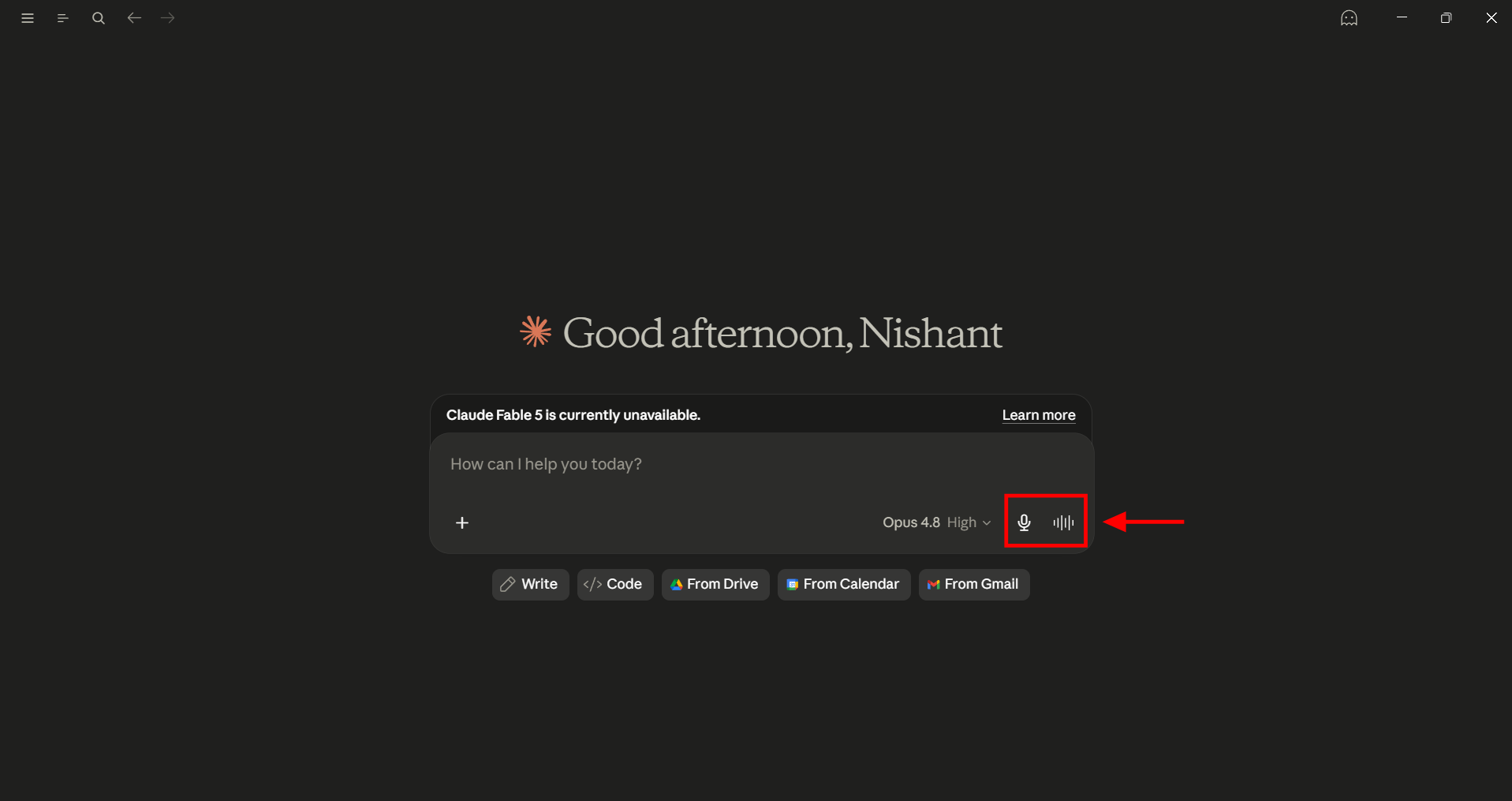
Claude has both dictation and full voice mode now, on iOS, Android, web, and desktop. You need to tap on the microphone in the message box to dictate a messy three-paragraph brief in 30 seconds instead of typing for three minutes. Voice mode goes further, giving you a two-way conversation where Claude talks back. Most people never tap that mic, and it's one of the fastest ways to get complicated context out of your head.
2. Show it, don't summarize it:
You don't need to paraphrase the thing in front of you that you want to talk about. You can just take a screenshot and add it to the chat, or a PDF, the spreadsheet, or the scanned contract. Claude can read the source directly, so a financial report you'd spend ten minutes condensing will only take about ten seconds to upload, and Claude will have the full document to work with instead of an incomplete summary of it.
3. Paste the link:
You don't need to copy an article into the chat. You can just paste the URL, ask your question, and have the web search option on. Claude will read the live page, which can be a job posting, a news story, or a docs page, in full, instead of whatever you remembered to highlight.
Getting better output
4. Have Claude fix your prompt first:
A good output relies on the prompt you use, but you don't need to be a prompt engineer to create a perfect prompt. When you are about to start an important task, describe your goal to Claude and paste in your drafted prompt, then ask Claude to rewrite it into something clearer and more specific before running anything. This is one extra step you need to go through, but the quality jump is big enough that you'll stop running first drafts.
5. Match the model to the task:
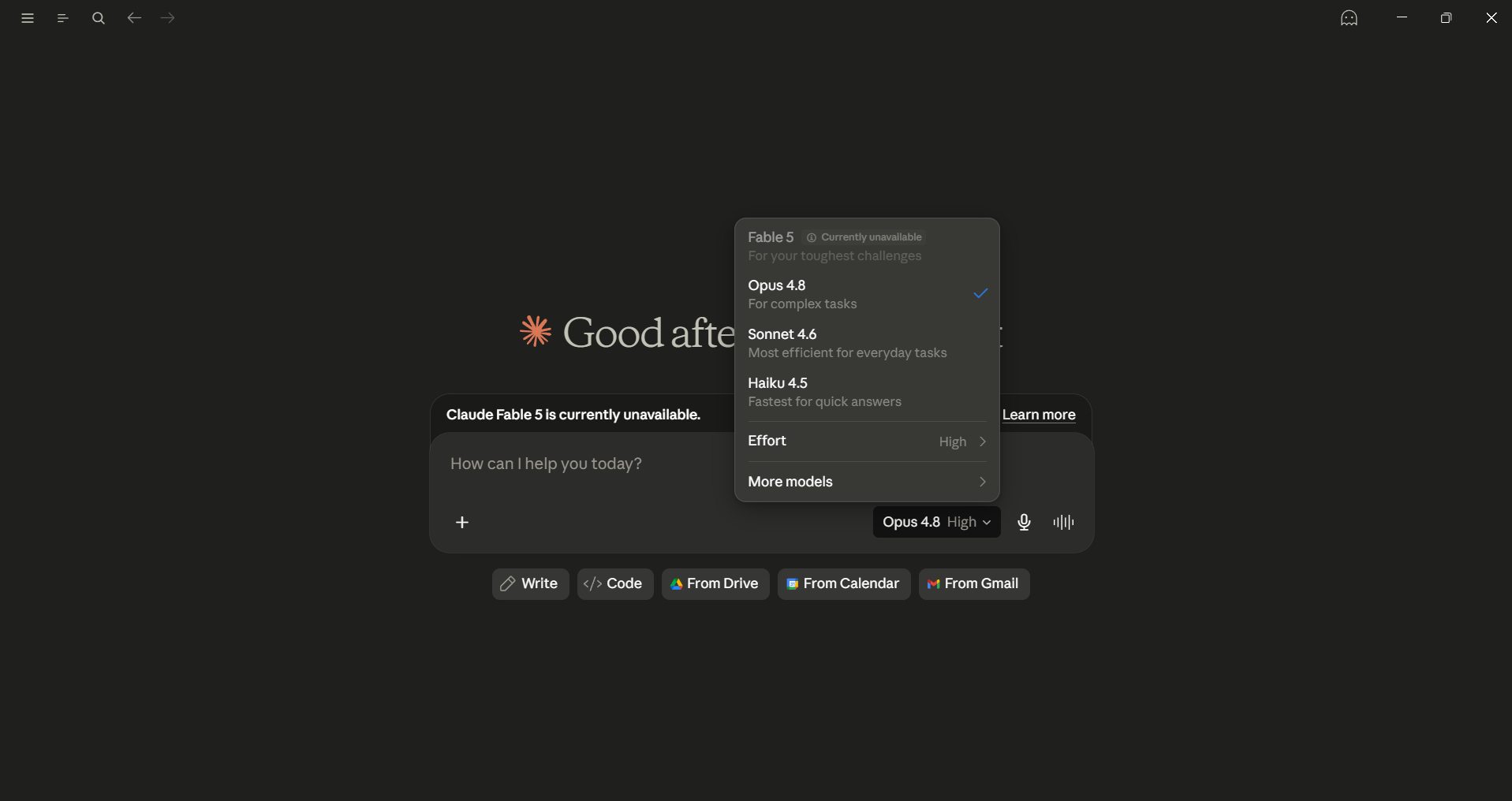
Currently, Anthropic has 4 major AI models.
- Haiku 4.5 is the speed tier for quick, simple requests.
- Sonnet 4.6 is the everyday workhorse for fast, capable, right for most work.
- Opus 4.8 can handle deep reasoning, strategy, and analysis.
- Fable 5, the newest top-tier model, is the most powerful model Anthropic offers for the hardest problems.
The model picker is at the very start of every chat, and switching models will take only 3 seconds and can change the output quality without touching your prompt.
6. Turn on adaptive thinking:
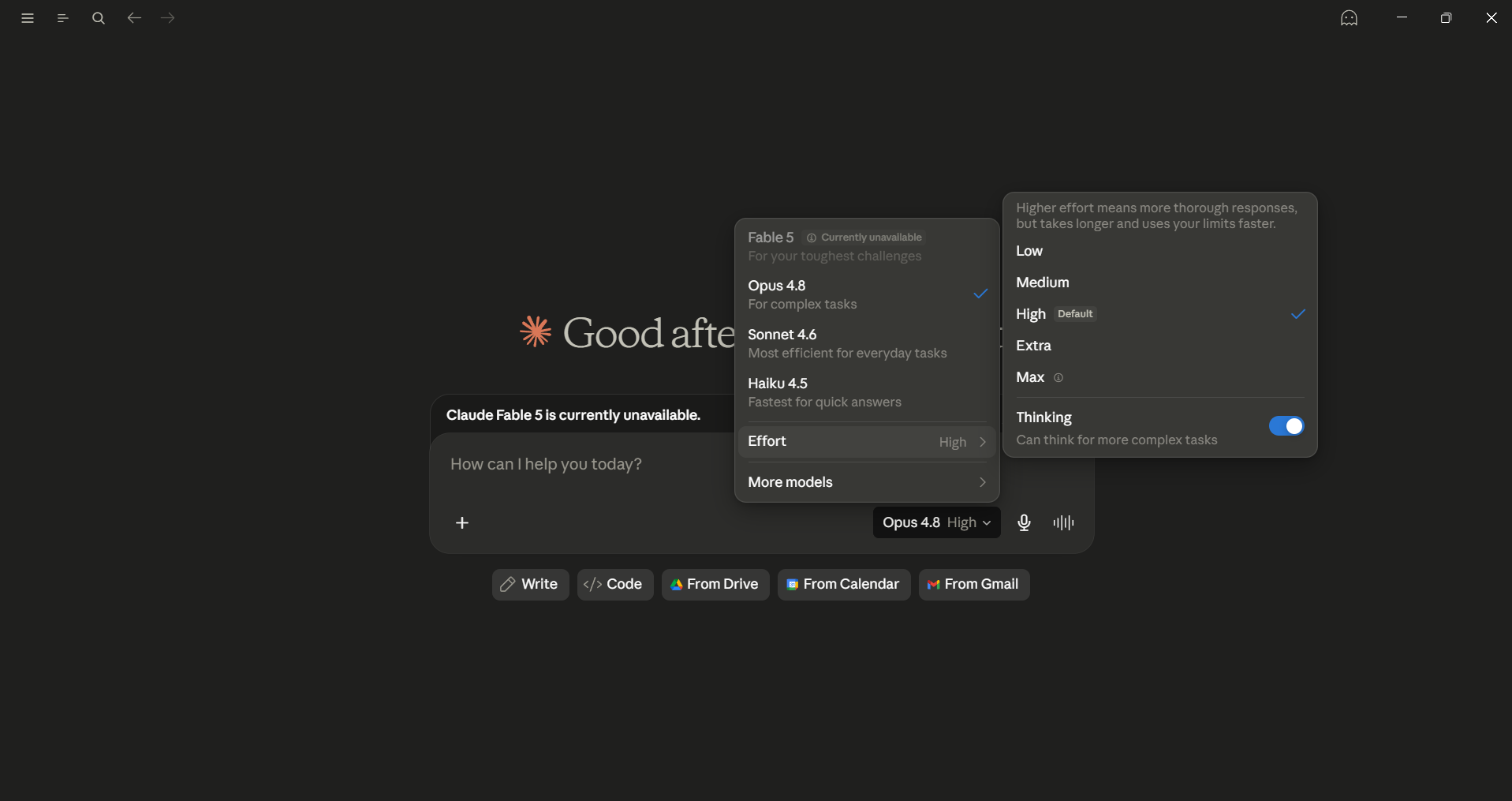
In the model picker, you can also set how hard Claude thinks, from low effort up to maximum. If you have a complex decision and analysis task, you can let Claude reason through the problem step by step before answering. For quick questions, keep it low. It's the same idea as the old extended thinking, now on a dial.
AdCreative.ai: An AI-powered platform that automates the creation of high-performing ad creatives for social media and display campaigns
7. Give Claude a role, not just a task:
If you prompt Claude, "Help me prepare for this meeting," you will get a generic answer. However, if you prompt Claude that "You're a sharp negotiator with 20 years of closing difficult deals, help me prepare," it will change what Claude questions, what it pushes back on, and what it won't let slide. You can define the background, the perspective, and how you want it to behave, then tell it to stay in that role.
What to set up once
8. Build a Project instead of a fresh chat:
Projects are persistent workspaces. You can easily create one, add documents and standing instructions, and Claude will hold it all. You can open that project next week and pick up exactly where you left off, with no need to re-explain who you are or how you like things done.
![Claude projects [aitoolsclub.com]](https://storage.ghost.io/c/71/a2/71a292cc-6628-490c-8b4c-3e5a55b86af8/content/images/2026/06/image-4.png)
9. Let Memory carry context for you:
This one's newer. With Memory on, Claude can automatically remember your preferences, work style, and recurring details across conversations, so you stop repeating yourself from session to session. You stay in control of what's stored.
10. Connect your tools:
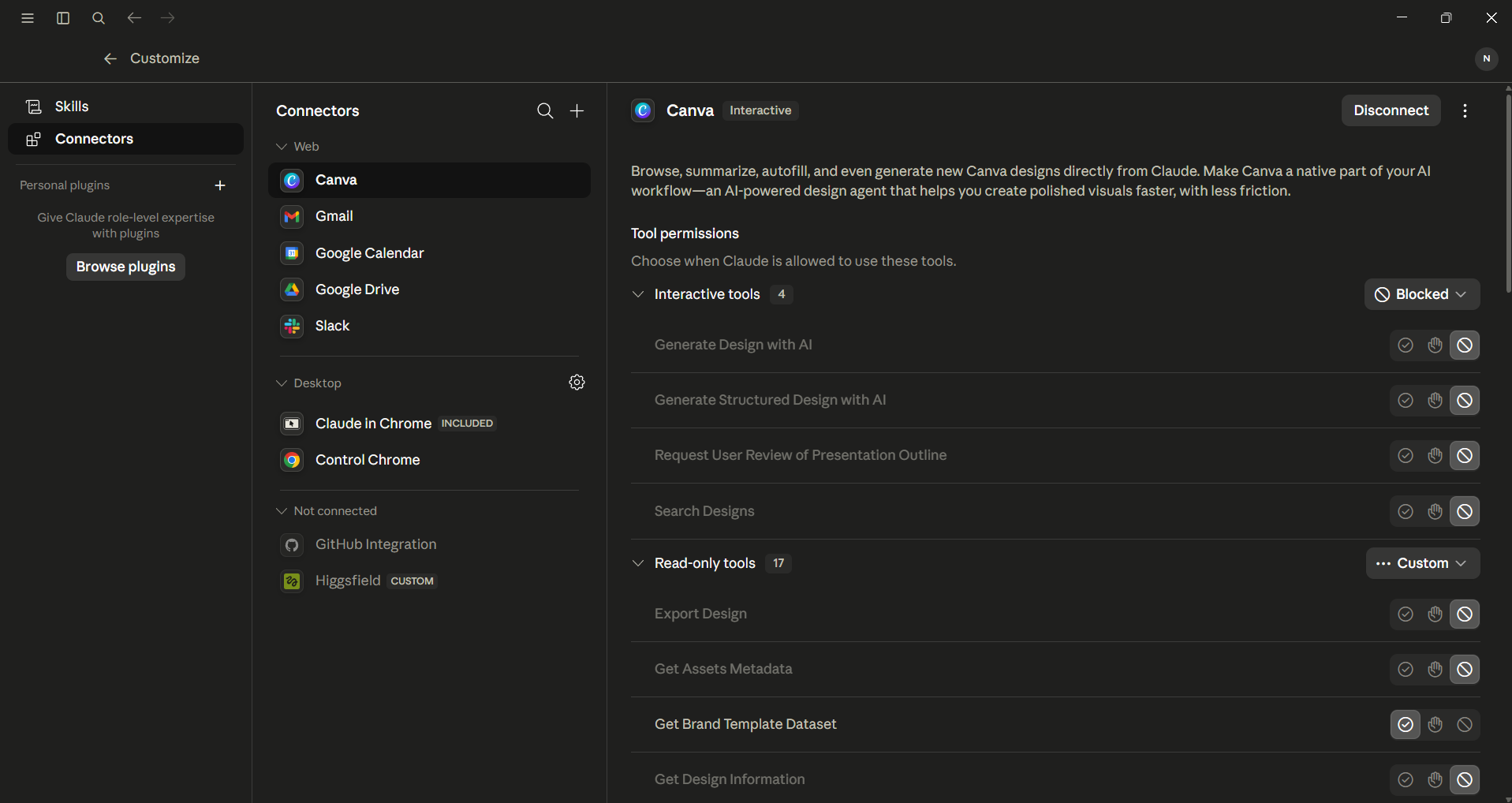
Connectors are most useful for knowledge workers as they allow you to link Claude to Gmail, Google Drive, Notion, Slack, and more. You can set Connectors once in settings, and then you can use them to pull a file or draft from a doc without leaving the chat.
Where Claude fits into real work
11. Save and reuse Artifacts:
Artifacts are the working tools (calculators, trackers, dashboards, small apps) that Claude can build inside the chat. Live Artifacts are part of Claude Cowork that are more powerful as they can pull fresh data each time you open them and remember state between sessions, and you can share them as live links.
12. Run Scheduled Tasks while you're away:
You can set a task once to Claude Cowork, like a morning news brief or a weekly summary, and Claude will run it automatically at the schedule you pick. The output will be waiting when you need it, without you having to trigger it yourself.
Bottomline
I use Claude every day, and so does every member of our team. After using it for so long, we can confidently say a few things. While Claude has 4 powerful AI models, you rely on Sonnet 4.6 for most of your everyday work, and you should only use Opus 4.8 or the newer Fable 5 for the hardest reasoning task, and Haiku only if you need speed.
The voice input feature is very powerful, especially the ability to go back and forth with the AI model, so you can make things clear without having to read blocks of text. One of the best things about Claude is its Memory feature, which remembers your working style and business goals, and you can update it anytime.
Anthropic is always innovating and making things better for consumers, and if you are a Claude AI user, these 12 features can be a game-changer for you.
💡 For Partnership/Promotion on AI Tools Club, please check out our partnership page.

