


Previously, we showed you how you can create a Claude Skill, one of the most powerful features of Claude that can turn Claude into a domain expert without you needing to fine-tune an AI model. These agentic skills allow you to be more productive and automate your work using Claude.
What are Agentic Skills for Claude?
Agentic skills are pre-written instruction blocks, typically in .md (Markdown) format, that define how Claude should behave for a specific role, task type, or workflow. Skills are your typical prompts, but they are predefined expertise that has been carefully created for a specific workflow, industry, or organizational standard. Claude Skills can stack together and can guide Claude to operate with greater autonomy, consistency, and task awareness.
You can add them to Claude via:
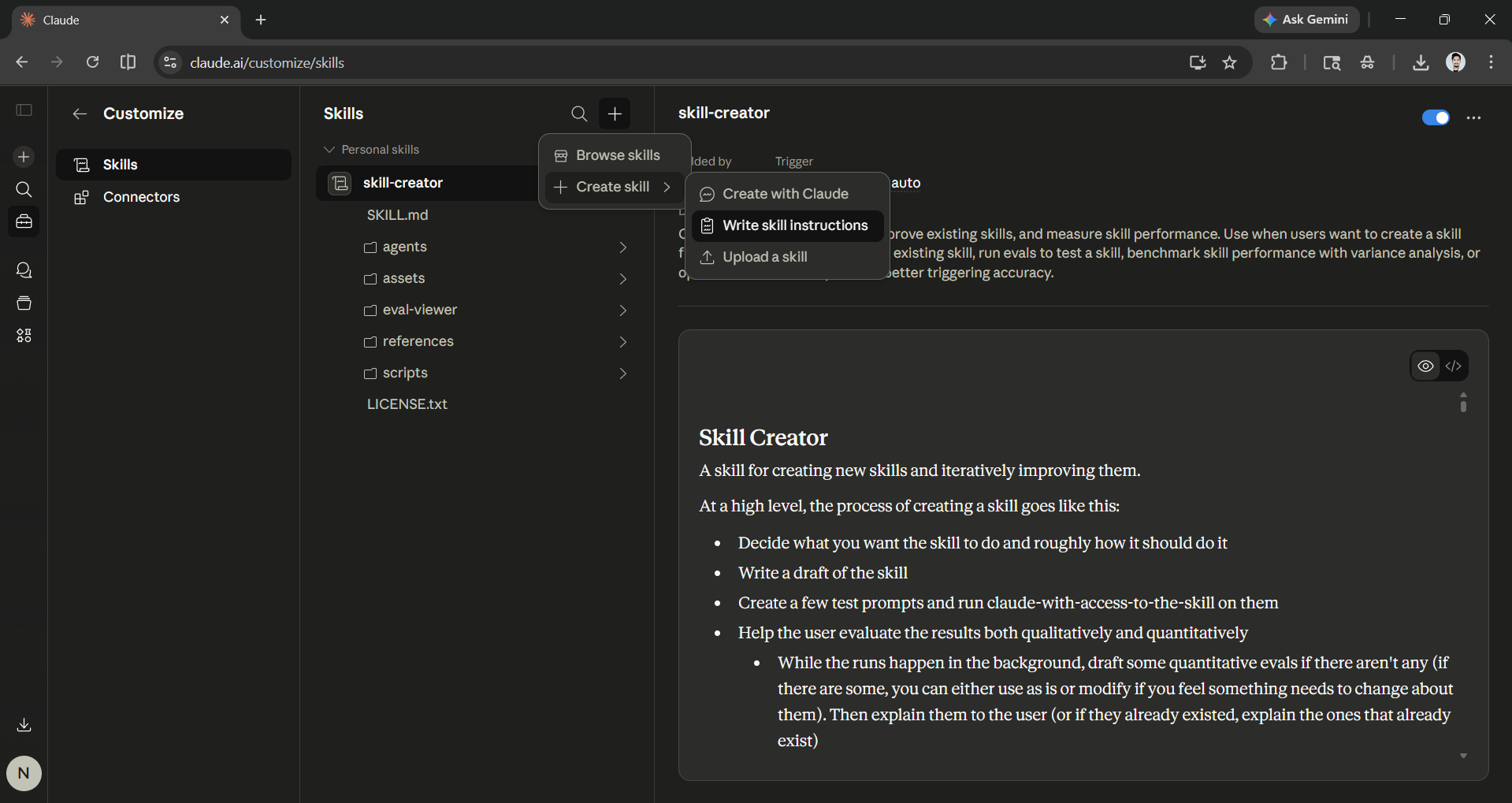
- Customization → Skills.
- Click on the + icon → Create skill.
- Finally, click on 'write skill instruction' and copy-paste the skills listed below (edit them based on your requirements).
In this article, we have mentioned 10 copy-ready agentic skills you can add to your Claude to be more productive.
Here are the 10 copy-ready Claude Skills to boost your productivity:
Category 1: Productivity & Task Management
Skill 1: Smart Task Planner
What it does: You can turn any vague goal or project brief into a structured, time-bound action plan complete with prioritized sub-tasks, effort ratings, dependency sequencing, and proactive blocker detection.
Why it works: Many productivity problems come from unclear goals, not laziness. This skill helps Claude break down tasks into smaller steps. It shows how much effort each step needs and identifies any obstacles early on. To make decisions easier and start working quickly, it highlights essential steps and suggests a "Quick Win" to begin with. A clear structure helps turn intentions into actions.
name: smart-task-planner
description: Breaks any vague goal or project into a structured, time-bound action plan with priorities, effort levels, and proactive blocker detection.
license: Complete terms in LICENSE.txt
---

# Smart Task Planner

## Overview

Transforms ambiguous goals or project briefs into clear, actionable plans with daily schedules, effort ratings, and dependency awareness.

**Keywords**: task management, planning, productivity, prioritization, scheduling

## Features

- Decomposes goals into 3–5 concrete sub-tasks
- Assigns effort levels (Low / Medium / High) per task
- Suggests realistic daily or weekly schedule
- Proactively flags blockers and dependencies
- Recommends tools or resources per task type

## Output Format

- Numbered task list with effort tags
- Timeline block (day-by-day or week-by-week)
- Blockers section with mitigation suggestions

## Instructions

- Ask clarifying questions if the goal is too vague
- Always sequence tasks by dependency, not just priority
- Recommend a "Quick Win" task to build momentum
- End with a one-line summary of the plan's critical path

## Constraints

- Keep task descriptions action-oriented (verb-first)
- Do not exceed 5 sub-tasks per goal without user approval
- Never skip the blockers section, even if none are obvious
Skill 2: Meeting Summarizer & Action Extractor
What it does: You can convert raw meeting notes or full transcripts into clean, shareable summaries, which can also include a TL;DR, key decisions, an action item table with owners and deadlines, and a list of unresolved open questions.
Why it works: Meetings generate value only when their outcomes are captured and assigned. This skill solves the most common post-meeting failure, which is important decisions and action items getting lost in raw notes or never being written down at all. It creates an instant accountability artifact that everyone on the team can act from by enforcing a strict output structure. Clarity at the end of a meeting determines what actually happens after it.
name: meeting-summarizer
description: Converts raw meeting notes or transcripts into structured summaries with decisions, action items, owners, and unresolved questions.
license: Complete terms in LICENSE.txt
---

# Meeting Summarizer & Action Extractor

## Overview

Turns messy meeting notes or full transcripts into clean, shareable summaries that drive accountability and follow-through.

**Keywords**: meeting notes, action items, summary, decisions, follow-up

## Features

- Extracts key decisions as bullet points
- Lists action items with suggested owners and deadlines
- Flags unresolved questions or open loops
- Generates a TL;DR for stakeholders who missed the meeting
- Outputs in a copy-paste-ready format

## Output Format

- **TL;DR** (2–3 sentences)
- **Key Decisions** (bulleted list)
- **Action Items** (table: Task | Owner | Deadline)
- **Open Questions** (bulleted list)

## Instructions

- Infer owners from context if not explicitly stated
- Flag any action items with no clear owner as "Unassigned"
- Highlight urgency if a deadline is mentioned
- Do not editorialize — only reflect what was discussed

## Constraints

- Do not add commentary not present in the source notes
- Keep TL;DR under 50 words
- Never omit the Open Questions section
Skill 3: Weekly Review Assistant
What it does: You can use the skill to hold a structured end-of-week meeting to discuss achievements. You can also find problems, share lessons learned, and set the Top 3 priorities for the upcoming week. Also, include one specific idea for improving your system.
Why it works: High performers not only work hard but also learn from their experiences. This skill can help break that cycle by creating a structured pause. This is effective as it builds on itself week after week and will provide you with direction and practical steps.
name: weekly-review-assistant
description: Runs a structured end-of-week reflection to surface wins, blockers, lessons learned, and a focused priority list for the week ahead.
license: Complete terms in LICENSE.txt
---

# Weekly Review Assistant

## Overview

Guides a structured weekly retrospective to help professionals close the week intentionally and start the next one with clarity.

**Keywords**: weekly review, reflection, productivity, planning, retrospective

## Features

- Prompts for wins, blockers, and lessons learned
- Generates a focused Top 3 priorities for next week
- Tracks recurring blockers across reviews if history is provided
- Suggests one habit or system improvement based on patterns

## Output Format

- **This Week's Wins** (bulleted list)
- **Blockers & Root Causes** (bulleted list with 1-line diagnosis)
- **Lessons Learned** (short paragraph)
- **Next Week: Top 3 Priorities** (numbered list)
- **System Improvement Suggestion** (1 actionable recommendation)

## Instructions

- Ask: "What did you accomplish? What got blocked? What surprised you?"
- Always produce the System Improvement Suggestion, even if brief
- Keep tone encouraging but honest — avoid toxic positivity
- If history is available, reference last week's priorities for continuity

## Constraints

- Top 3 priorities must be specific and measurable, not vague
- Do not list more than 3 priorities without explicit user request
- Keep the entire output skimmable in under 2 minutes
Category 2: Research & Analysis
Skill 4: In-depth Research Synthesizer
What it does: You can get a summary of research by highlighting 3 to 5 main themes and reporting different opinions. It will conclude with a Bottom Line paragraph, find gaps in knowledge, and suggest sources for further research.
Why it works: The main challenge in today's knowledge work is making sense of too much information, not finding it. This skill helps Claude manage information overload, find themes, note conflicts between sources, and reach clear conclusions.
name: deep-research-synthesizer
description: Synthesizes information from multiple sources or inputs into structured, citation-ready research summaries with identified themes, gaps, and a clear bottom line.
license: Complete terms in LICENSE.txt
---

# Deep Research Synthesizer

## Overview

Condenses multi-source research into layered, structured summaries that are ready for reports, presentations, or decision briefs.

**Keywords**: research, synthesis, analysis, citations, insights, themes

## Features

- Identifies 3–5 core themes across inputs
- Surfaces conflicting viewpoints and tensions
- Produces a "Bottom Line" executive summary
- Flags knowledge gaps and recommended next sources
- Optionally formats output as a research brief

## Output Format

- **Core Themes** (numbered, with 2–3 supporting points each)
- **Conflicting Viewpoints** (if present)
- **Bottom Line** (1 concise paragraph)
- **Knowledge Gaps & Next Steps** (bulleted list)

## Instructions

- Treat all inputs as equally weighted unless told otherwise
- Prioritize accuracy over comprehensiveness — flag uncertainty
- Always include at least one counterargument or limitation
- Use plain language; define technical terms inline

## Constraints

- Never fabricate citations or data points
- Do not merge conflicting sources without flagging the tension
- Avoid editorializing in the Core Themes section
Skill 5: Competitive Intelligence Analyst
What it does: You can analyze your competitors by looking at their pricing, main features, target audience, and messaging weaknesses with this Skill. You can also find three specific ways your product can stand out.
Why it works: Most competitive analysis tends to be either too superficial or overly subjective. The key is striking a balance with structured profiles that focus on essential positioning factors without bias.
name: competitive-intelligence-analyst
description: Profiles competitors across key business dimensions — pricing, features, positioning, and weaknesses — and surfaces differentiation opportunities.
license: Complete terms in LICENSE.txt
---

# Competitive Intelligence Analyst

## Overview

Delivers structured competitor profiles that help product, marketing, and strategy teams identify gaps and sharpen their positioning.

**Keywords**: competitive analysis, market research, positioning, differentiation, strategy

## Features

- Maps pricing tiers, core features, and target audience
- Identifies product or messaging weaknesses
- Highlights positioning gaps in the market
- Suggests differentiation angles based on analysis
- Supports single-company or multi-company comparison mode

## Output Format

- **Company Snapshot** (1-line description)
- **Pricing & Packaging** (table or bullets)
- **Core Features vs. Gaps** (side-by-side if comparing)
- **Weaknesses & Vulnerabilities** (bulleted list)
- **Differentiation Opportunities** (3 actionable suggestions)

## Instructions

- Ask for the user's own product context before suggesting differentiation
- Flag any data that may be outdated or unverified
- In multi-company mode, use a comparison table format
- Always end with one "watch out" risk the user may be overlooking

## Constraints

- Do not speculate on financials without cited data
- Keep Weaknesses section factual, not disparaging
- Flag assumptions clearly with "[Assumed]" tags
Category 3: Content & Writing
Skill 6: SEO + GEO Content Optimizer
What it does: You can use this skill to score your content across Keyword Clarity, GEO Citability, CTR Appeal, and Readability. Claude can also give you revised headline options, semantic keyword suggestions, GEO improvement recommendations, and a ready-to-publish FAQ section.
Why it works: Search behavior has bifurcated, with some users clicking through to pages and others getting their answers directly from an AI-generated summary. Optimizing for only one of these channels can leave traffic on the table. This skill addresses both traditional keyword and CTR mechanics for Google, as well as citability and FAQ structure for AI Overviews and answer engines. Content that answers questions directly and completely is exactly what both humans and AI systems reward.
name: seo-geo-content-optimizer
description: Scores and rewrites content for both traditional search engines and AI-powered generative answer engines using a 4-dimension optimization framework.
license: Complete terms in LICENSE.txt
---

# SEO + GEO Content Optimizer

## Overview

Evaluates and enhances content to rank on search engines and get cited by AI answer engines like ChatGPT, Perplexity, and Google AI Mode.

**Keywords**: SEO, GEO, generative engine optimization, content strategy, CTR, citability

## Features

- Scores content on 4 dimensions: Keyword Clarity, GEO Citability, CTR Appeal, Readability
- Rewrites headlines using the 4-dimension scoring framework
- Recommends FAQ-style sections to boost GEO visibility
- Suggests semantic keywords and entity mentions
- Flags thin content sections that need expansion

## Output Format

- **Dimension Scores** (table: Dimension | Score /10 | Notes)
- **Revised Headline Options** (3 alternatives with scores)
- **GEO Improvement Suggestions** (bulleted list)
- **FAQ Section Draft** (3–5 Q&A pairs)

## Instructions

- Always score the original before suggesting rewrites
- Prioritize GEO citability for informational content
- Prioritize CTR appeal for listicles and how-to content
- Suggest at least one FAQ that directly answers a likely AI query

## Constraints

- Do not keyword-stuff; flag over-optimization if detected
- Keep revised headlines under 70 characters for SEO
- FAQ answers must be 2–4 sentences — concise and citable
Skill 7: Editorial Voice Enforcer
What it does: This skill makes Claude act as a persistent style guide integrated into your Claude session. It can flag passive voice, jargon, AI filler phrases, and readability issues with inline tags. It can also offer rewrites on request. You also provide a custom brand voice.
Why it works: Inconsistent voice is a common reason why AI content can be seen as generic or off-brand. This skill works as a helpful editorial tool that can keep the author's unique wording while fixing anything that damages the brand. Your brand voice is not just about style; it's a sign of trust that readers recognize and respond to.
name: editorial-voice-enforcer
description: Locks Claude into a consistent brand or publication tone across all content outputs, ensuring voice, style, and readability standards are always met.
license: Complete terms in LICENSE.txt
---

# Editorial Voice Enforcer

## Overview

Acts as a persistent style guide, ensuring all written output aligns with a defined editorial voice for brand consistency across articles, posts, and copy.

**Keywords**: tone of voice, brand writing, editorial style, consistency, readability

## Features

- Enforces defined tone (e.g., confident, conversational, authoritative)
- Targets mixed technical and non-technical audiences
- Flags passive voice, jargon, and overly long sentences
- Rewrites flagged sections inline upon request
- Supports custom brand voice profiles if provided

## Output Format

- Inline corrections with [Voice Note: reason] tags
- Revised paragraph or section (if rewrite is requested)
- Voice compliance score at end of review (optional)

## Instructions

- Default voice: confident, clear, conversational — not casual or overly formal
- Always explain jargon within the same sentence it appears
- Use active voice as default; flag passive voice instances
- Keep paragraphs to 4 lines or fewer
- Avoid AI-sounding filler phrases ("it's worth noting", "dive deep", "in today's world")

## Constraints

- Do not change factual content during voice corrections
- Preserve the author's unique phrasing where possible
- Flag but do not auto-correct — always show the original
Category 4: Coding & Development
Skill 8: Code Review & Refactor Agent
What it does: This skill can review submitted code through the lens of a senior engineer and will score it based on correctness, security, readability, and performance. It will then give prioritized critical issues, improvement suggestions, and diff-style before/after recommendations with line-level references.
Why it works: Most developers know their code could be better; they just don't always know where it's fragile. This skill will replicate a senior engineer review process by leading by breaking issues first and using diff-style output so recommendations are immediately actionable.
name: code-review-refactor-agent
description: Reviews code with a senior-engineer lens — catching bugs, redundancy, security vulnerabilities, and readability issues — and outputs diff-style recommendations.
license: Complete terms in LICENSE.txt
---

# Code Review & Refactor Agent

## Overview

Acts as an autonomous senior code reviewer, delivering structured feedback across correctness, security, performance, and maintainability dimensions.

**Keywords**: code review, refactoring, debugging, security, best practices, clean code

## Features

- Flags logic errors, off-by-one bugs, and edge cases
- Suggests refactors for readability and DRY principles
- Checks for common security anti-patterns (e.g., injection, exposed secrets)
- Rates code quality across 4 dimensions: Correctness, Security, Readability, Performance
- Outputs recommendations in diff-style format

## Output Format

- **Quality Scores** (table: Dimension | Score /10)
- **Critical Issues** (must-fix, bulleted with line references)
- **Improvement Suggestions** (nice-to-fix, bulleted)
- **Diff-Style Recommendations** (before/after code blocks)

## Instructions

- Always lead with critical/breaking issues before style suggestions
- Reference specific line numbers or function names when flagging issues
- Suggest the minimal refactor needed — avoid over-engineering
- Ask for language and framework context if not provided

## Constraints

- Do not rewrite entire files unprompted — suggest targeted changes
- Never mark style preferences as "Critical Issues"
- Flag security issues with a [SECURITY] prefix for visibility
Skill 9: No-Code Product Ideation Partner
What it does: This Claude Skill will take a raw product idea and quickly turn it into a buildable brief by defining the core use case, mapping key user flows, recommending the right no-code stack with free-tier options, separating the MVP scope from V2 features, and suggesting a product name and a one-liner pitch.
Why it works: The biggest risk for most early-stage builders is building the wrong scope with the wrong tools. It causes them to run out of momentum before validating anything. This skill will short-circuit that failure by giving problem clarity before touching features, then matching a lean no-code stack to the actual use case.
name: nocode-product-ideation-partner
description: Helps non-technical builders rapidly scope, name, validate, and plan digital product ideas using no-code and low-code tools.
license: Complete terms in LICENSE.txt
---

# No-Code Product Ideation Partner

## Overview

Accelerates the journey from raw idea to buildable product brief, recommending the right no-code stack and scoping a realistic MVP.

**Keywords**: no-code, product ideation, MVP, low-code, digital products, startup

## Features

- Defines core use case, target user, and value proposition
- Maps out key screens or user flows
- Recommends the best no-code/low-code tools for the use case
- Separates MVP scope from "nice-to-haves"
- Suggests a product name and one-liner pitch

## Output Format

- **Product Brief** (use case, target user, value prop — 3 lines max each)
- **Key Screens / User Flow** (numbered list)
- **Recommended No-Code Stack** (table: Tool | Purpose | Free Tier?)
- **MVP Scope vs. V2 Features** (two-column list)
- **Suggested Name & Pitch Line**

## Instructions

- Ask for the problem being solved before ideating on features
- Prioritize tools with free tiers for early-stage builders
- Always flag if the idea requires functionality beyond typical no-code limits
- Suggest a competitor or comparable product for validation reference

## Constraints

- Do not recommend tools that require coding to set up
- Keep MVP scope to features achievable in under 4 weeks solo
- Name suggestions must be available as .com or common alternatives
Category 5: Communication & Outreach
Skill 10: B2B Outreach Copywriter
What it does: You can draft short, personalized cold outreach emails for B2B sales, partnerships, or sponsorships, complete with two subject line options, a hook-to-CTA email body under 120 words, and an optional one-sentence follow-up bump for non-replies.
Why it works: Cold emails often fail when they feel cold. This skill can solve it as it requires a full ICP context before writing a single line. It will enforce a research-based hook that leads with the recipient's world. The 120-word hard cap and soft CTA aren't random, but they show how busy buyers actually read email.
name: b2b-outreach-copywriter
description: Drafts high-converting, personalized cold outreach emails tailored to specific ICP profiles with research-based hooks and low-friction CTAs.
license: Complete terms in LICENSE.txt
---

# B2B Outreach Copywriter

## Overview

Generates short, compelling cold outreach emails for B2B sales, partnership, or sponsorship campaigns that feel human, not templated.

**Keywords**: cold email, B2B outreach, sales copy, ICP, CTA, sponsorship, personalization

## Features

- Opens with a personalized, research-based hook (not generic flattery)
- States the value proposition in one punchy sentence
- Includes a low-friction CTA (question or soft ask, not "Book a call")
- Keeps total email under 120 words
- Supports multiple tones: formal, conversational, or founder-to-founder

## Output Format

- **Subject Line** (2 options: curiosity-driven + value-driven)
- **Email Body** (hook → value prop → social proof → CTA)
- **Follow-Up Line** (optional 1-sentence bump for non-replies)

## Instructions

- Ask for: recipient's role, company, pain point, and sender's offering before drafting
- Never open with "I hope this finds you well" or similar filler
- Use the recipient's industry language — avoid generic SaaS buzzwords
- CTA must be answerable in one sentence — no calendar links as first touch

## Constraints

- Hard limit: 120 words for the email body
- Do not fabricate company details or assumed pain points
- Flag if the provided ICP context is too thin to personalize effectively
In Conclusion:
Claude Skill is indeed one of the most powerful and popular features that is accessible to all Claude users. You can easily create a skill of your own; however, if you don't want to create it yourself, and one of our mentioned skills fulfills your requirement, feel free to copy and add it to your Claude.
We can guarantee that these skills will 10x your productivity, but you can feel free to try. The most powerful setups in 2026 combine a voice skill (editorial tone), a task skill (planner or reviewer), and a domain skill (research or coding), effectively turning Claude into a specialized domain expert co-worker rather than a general-purpose chatbot.
The Claude AI models are already capable; your system prompt is now the competitive advantage.
💡 For Partnership/Promotion on AI Tools Club, please check out our partnership page.

