

People are using artificial intelligence (AI) for educational purposes more than ever; according to OpenAI, 140 million people use ChatGPT each week to understand math and science concepts alone. For a long time, we studied new mathematical and scientific concepts and theories through abstraction, without ever seeing or interacting with them visually. Fortunately, OpenAI realised that and has added interactive visuals in ChatGPT for maths and science learning. Now, instead of staring at the formulas on paper, you can use ChatGPT as an on-demand tutor that lets learners feel how equations and scientific principles behave.
What are the new Interactive Visuals in ChatGPT for Math and Science Learning?
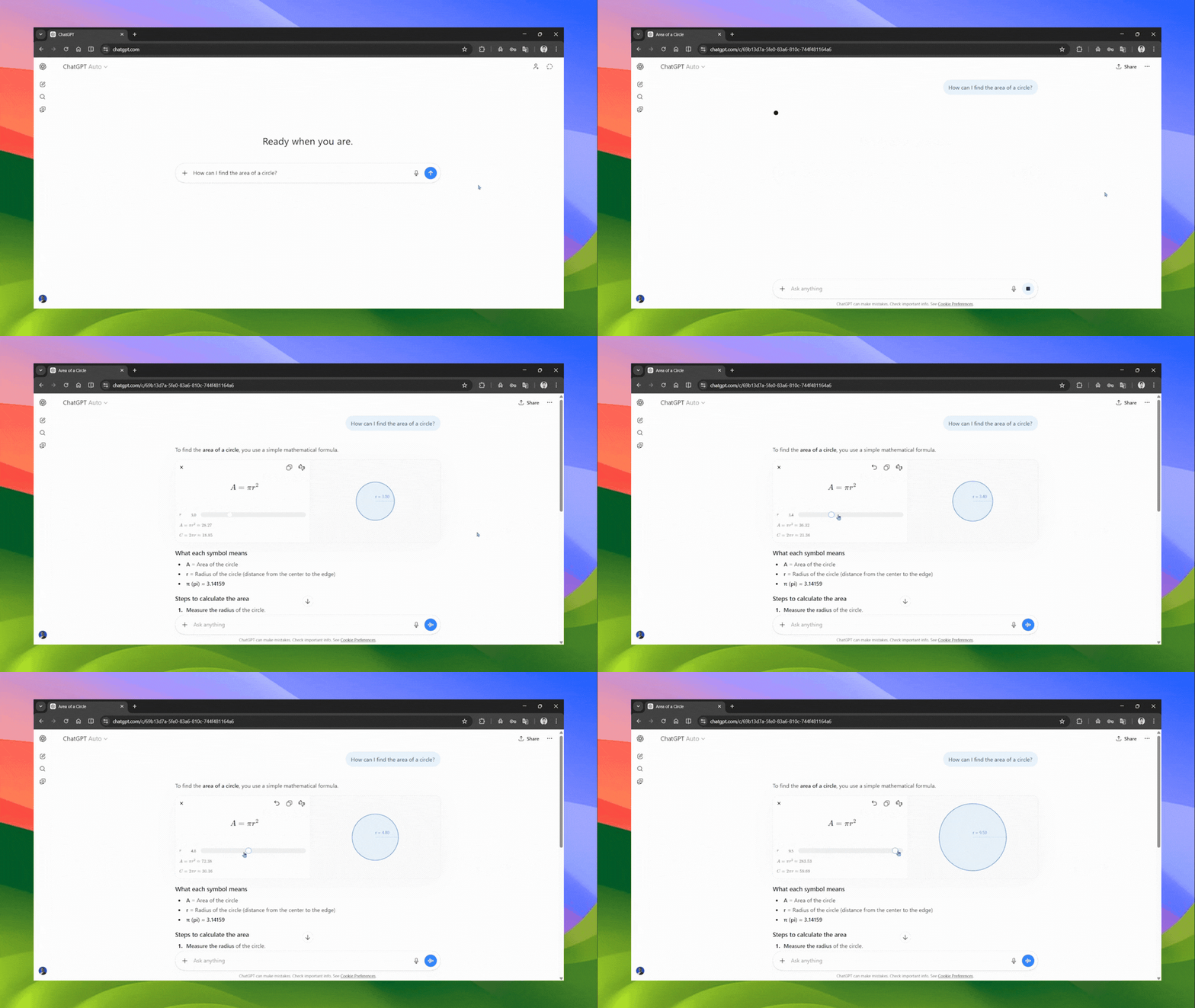
The new ChatGPT interactive visuals for math and science learning feature can generate an interactive visual module that users can directly manipulate, along with the concept explanation. You no longer get just a wall of text or a static diagram; instead, you can experience how concepts work hands-on.
- You can ask ChatGPT about the Pythagorean theorem, and it will not only explain it but also present a live triangle where you can drag the sides and watch the hypotenuse update in real time.
- You can ask about Ohm's Law, and sliders for voltage, current, and resistance will appear, allowing you to adjust one variable and instantly observe how the others respond.
The same principle applies to over 70 core math and science topics at launch, covering everything from basic algebra to physics and financial mathematics.
AINews.sh: Stay ahead with the latest AI product releases, in-depth reviews, and news. Compare AI tools, open-source models, and paid platforms.
Some of the included concepts span a broad academic range:
- Physics: Ohm's Law, Coulomb's Law, Hooke's Law, kinetic energy, Charles' Law
- Mathematics: Pythagorean theorem, binomial squares, exponential decay, trigonometric identities, linear equations, difference of squares
- Applied concepts: Compound interest, area of a circle, lens equations, exponential growth
The feature is available immediately to all logged-in ChatGPT users worldwide, across both free and paid plans, making it one of OpenAI's most accessible educational releases to date.
How to use ChatGPT Interactive Visuals for Math and Science Learning:
Open ChatGPT and enter the prompt similar to the following for the maths or science concept you want to learn.
Prompts to try:
- Help me understand the Pythagorean Theorem

Base44: An AI-powered platform that empowers anyone to transform their ideas into fully-functional apps within minutes, all without coding.
- Explain how PV=nRT works

- How can I find the area of a circle?
In Conclusion:
The interactive visuals feature builds on a growing suite of learning-specific features OpenAI has been quietly assembling within ChatGPT:
- Study Mode (launched last year): The ChatGPT Study Mode guides students step-by-step through problems rather than handing them direct answers, designed to encourage reasoning over shortcut-seeking.
- Quizzes: Help learners test recall and prepare for exams through adaptive questioning.
- Dynamic Visual Explanations: Adds the experiential, hands-on layer that text and static diagrams cannot provide.
Together, these tools suggest OpenAI is pursuing a deliberate arc of repositioning ChatGPT not just as a productivity assistant, but as a serious, research-backed learning platform. The company has also started the OpenAI Learning Lab, through which it plans to publish ongoing research on how AI shapes learning outcomes over time, and it is collaborating with the broader education ecosystem to improve these tools based on evidence.
💡 For Partnership/Promotion on AI Tools Club, please check out our partnership page.
