


Google Labs, a popular platform for trying the latest Google AI experiments, innovative tools, and technologies, has launched a new AI productivity tool called CC. You don't need to download any new piece of software, as it is simply an email address you can talk with to request information from across your Gmail, Calendar, and Drive.
What is CC by Google Labs?
CC is an experimental AI productivity agent in Gmail by Google Labs that connects your Gmail, Calendar, and Drive to deliver a personalized briefing every morning. CC can send you customizable morning briefings that summarize what matters to you, meetings, tasks, and key updates.
According to a survey by inboxzero, only about 10% of work emails are truly business-critical, while the other 90% is either semi-important, newsletter/marketing, or pure junk mail. Hence, people often lose several hours on emails that probably didn't need their attention. That is where you can use CC to get custom morning briefs that matter to you.
AdCreative.ai: An AI-powered platform that automates the creation of high-performing ad creatives for social media and display campaigns.
Key Features and Functions of CC:
CC is designed to be lightweight but high-utility. Here is what you can expect if you join the experiment:
- "Your Day Ahead" Briefing: A morning email that summarizes your schedule, tasks, and essential updates (email drafts and calendar links), helping you start the day with a plan rather than panic.
- Proactive Drafts: The AI productivity agent can prepare email drafts (replies, reach out, & follow-ups) for you to review and send, saving you time and the friction of starting from a blank page.
- On-Demand Assistance: You can email CC anytime to ask questions, search through your connected data, or request help with drafting replies.
- Calendar Management: When asked, CC can create events directly on your calendar. For privacy, these added events list only you.
- Customization: The agent learns from your interactions. You can teach CC your preferences, correct it, and add to-dos by replying to the briefing or emailing it directly.
How you actually use CC in Gmail:
CC is currently a Google Labs experiment, so you don't get it automatically just because you have Gmail. Google says participation is voluntary, and you join through a waitlist.
A few practical details matter here:
- A prerequisite setting: As of writing this article, there is a waiting list, and Google also notes that you must have Workspace "Smart Settings" enabled before signing up.
- Emailing CC: You reach it at [your-username][email protected].
- Thread summaries (private replies): You can add CC to an email thread to request a summary, but it will reply privately only to you.
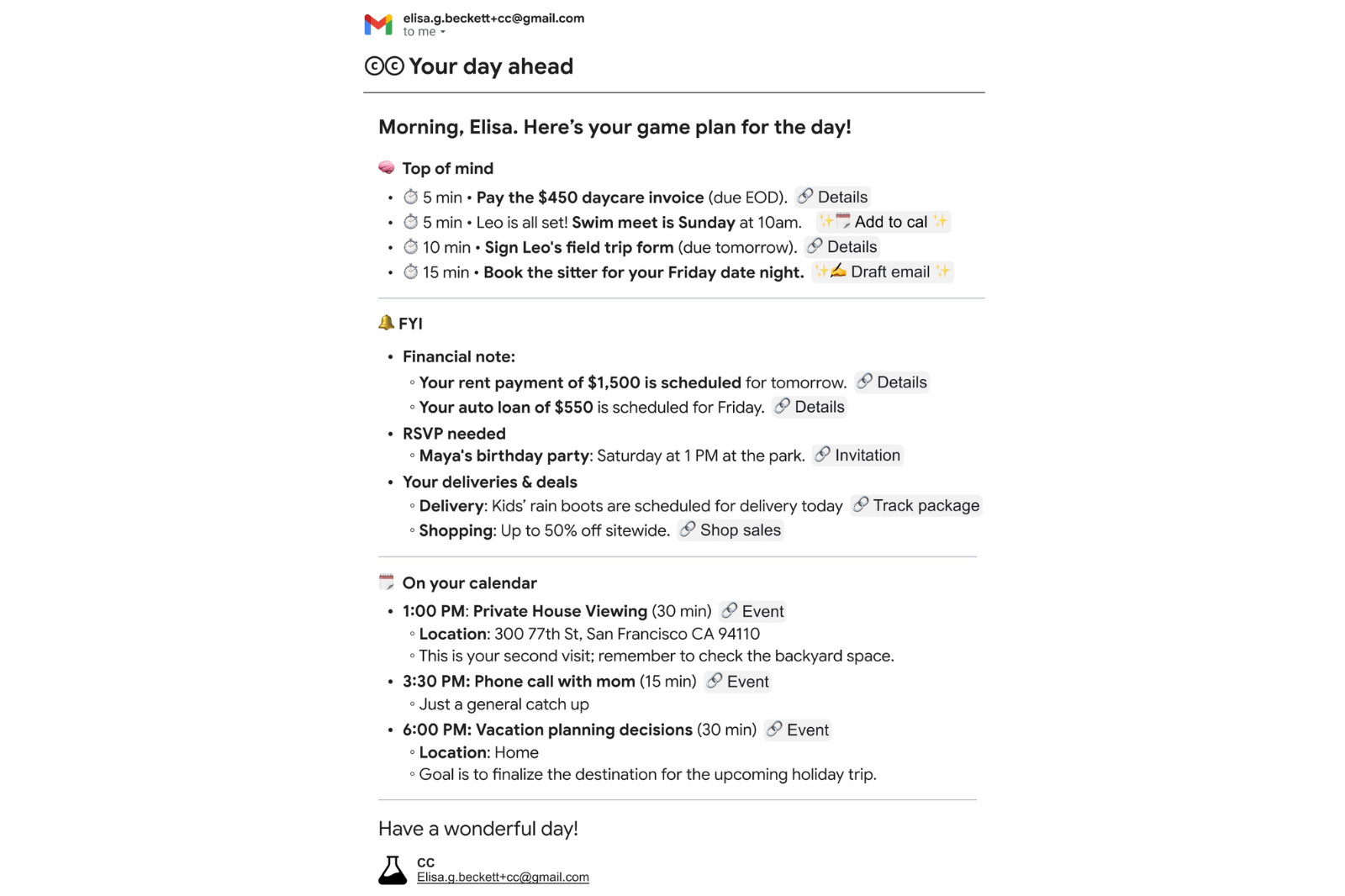
The best thing about this AI productivity agent is that it offers an email-only workflow where you don't need to learn any new UI. You get your morning briefings by email, and you can customize CC through emails.
In Conclusion:
CC can be a powerful AI productivity agent that is lightweight and high-utility. It can reduce the time spent on reviewing emails and searching for information from your calendar, inbox, and Drive. What I like about CC is that you can teach your preferences, and in case you don't find utility in the AI productivity agent, you can also disconnect from it at any time.
💡 For Partnership/Promotion on AI Tools Club, please check out our partnership page.

