

Since early 2025, autonomous AI agents have taken over the world, and every major AI and tech company has launched or integrated at least one AI agent as a product or within their existing product line. AI agents are known for being autonomous, able to think and take actions to complete entire tasks on behalf of users. The problem with AI agents right now is that when you ask them to complete a coding task, like fixing a bug, they turn it into three parallel tasks, including patching the bug, updating the tests, and writing a short release note. Now, if you multiply that by a couple of repos, a few half-finished branches, and the reality that humans still need to review what ships, it becomes a lengthy process. That is where the Codex app by OpenAI can help you.
What is the Codex app?
The Codex app is a powerful command center from OpenAI, designed to effortlessly manage multiple agents simultaneously, run coding agents in parallel, review what they changed, and keep long-running tasks organized across projects. The Codex app won't make an agent code, but make agent work organized, inspectable, and shareable.
Base44: An AI-powered platform that empowers anyone to transform their ideas into fully-functional apps within minutes, all without coding.
Key feature of the Codex app:
- Multi-agent workflows: You can have separate agent threads working in parallel across different tasks/projects.
- Keep changes isolated with worktrees: The app uses Git worktrees so that different agent tasks don't collide with each other while they modify the same repo.
- Use Skills: Skills include tools and conventions so Codex can follow your team's workflow consistently, and the same skills can be used across the app, CLI, and IDE extension.
- Set up scheduled Automations: You can schedule background workflows (like issue triage or CI summaries). When an automation finishes, results land in a review queue so you can pick up from there.
- Built-in review and Git tooling: The app includes a review pane/diff workflow and built-in Git features to track and manage changes.
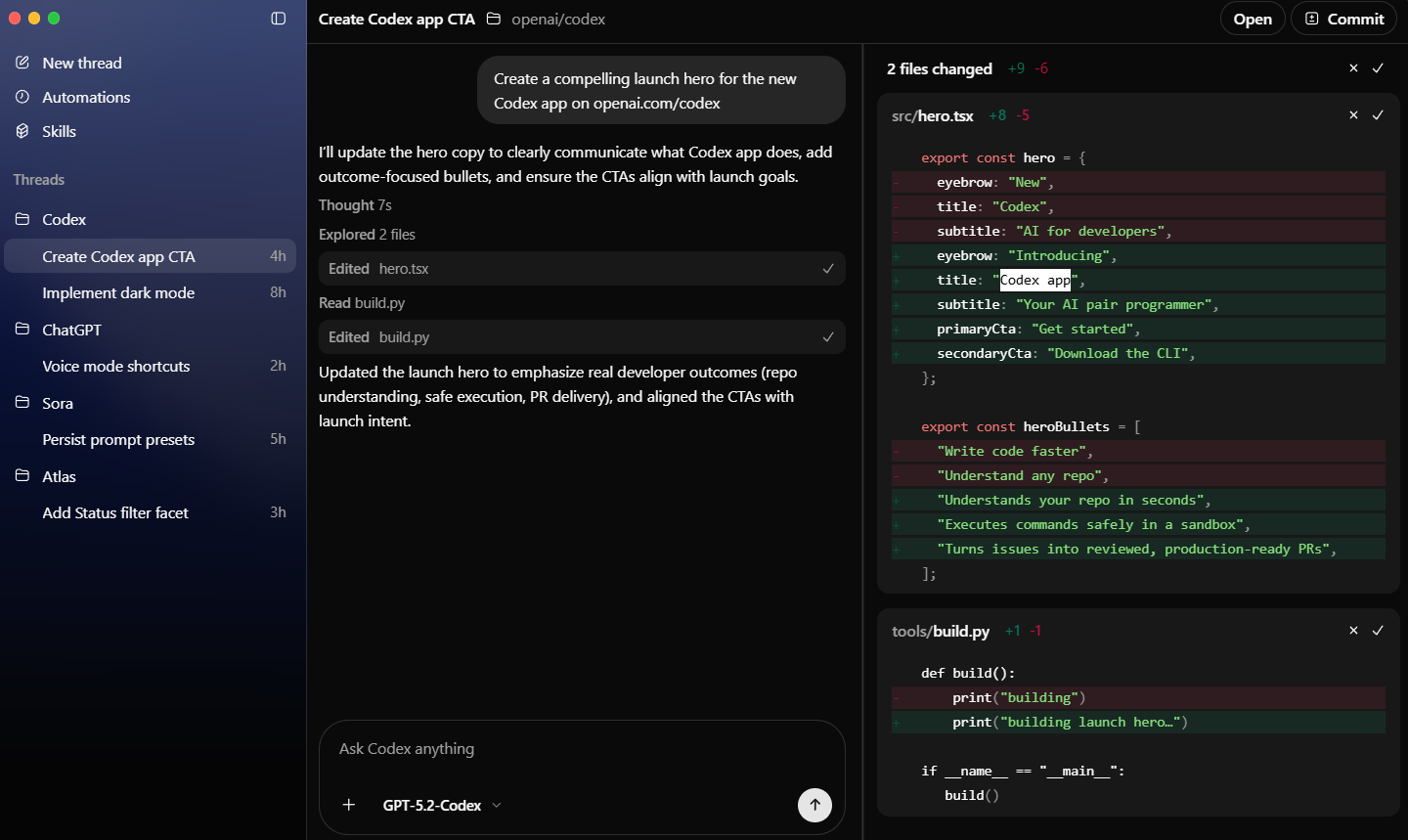
Below are the three big building blocks of the Codex app:
1. Multitask with multiple agents in parallel
The Codex app organizes work into separate agent threads by project, so you can switch between tasks without losing context. In each thread, you can review what the agent changed, comment on the diff, and open it in your editor for manual edits when you want tighter control. To keep parallel changes from colliding, the app supports worktrees, which let multiple agents work on the same repository without conflicts by giving each agent an isolated copy ("checkout") of your code.
Key features and what they're for:
- Project-based threads: Separate threads per task, grouped by project, for cleaner context switching.
- Diff review and inline feedback: Review changes and comment on diffs inside the thread.
- Worktrees for isolation: Agents can work in parallel using Git worktrees, preventing task interference.
- Optional local checkout: You can check out an agent's changes locally when you want, or let it keep going without touching your local Git state.
2. Create and use Skills
Skills are Codex's way to turn repeatable team workflows into something the agent can follow reliably. A skill package includes instructions, resources, and optional scripts, and the app includes an interface to create and manage them. You can explicitly tell Codex to use specific skills, or let it select skills automatically based on what you're asking. Skills also travel across where you work: the same skills can be used in the app, the CLI, and the IDE extension, so you can check skills into your repository for the whole team to share.
What Skills add in practice:
- Packaged workflows: Instructions, resources, and scripts bundled to run a process consistently.
- Two ways to use them: Explicit selection or automatic skill choice based on the task.
- Cross-surface reuse: Skills work across the app, CLI, and IDE extension.
- Team sharing: Skills can be checked into a repo for broader access.
Real examples: Skills that fetch design context from Figma, manage issue workflows in Linear, and deploy to cloud hosts like Cloudflare or Vercel.
MeetGeek: An AI-powered meeting assistant that automatically records, transcribes, summarizes, and analyzes virtual meetings in real time.
3. Set up Automations
Automations are for recurring tasks you'd rather not keep re-prompting, for example, triage issues daily, summarize CI failures, draft a release brief, and similar maintenance work.
In the Codex app, Automations run on an automatic schedule you set, can include optional skills, and importantly, drop their results into a review queue when finished so you can validate and continue if needed. In Git repos, automations run on dedicated background worktrees to avoid clashing with whatever you're doing locally.
What Automations do well:
- Scheduled runs: Time-based execution, you set once.
- Skills-aware delegation: Pair an automation with the skills it needs to follow your preferred workflow.
- Review queue output: Results land in a review queue instead of silently changing things.
- Background worktrees: Runs in dedicated worktrees to reduce conflicts.
In Conclusion:
In simple terms, you can call the Codex app coordination software for agents that can run multiple threads, keep changes isolated with worktrees, encode repeatable workflows as Skills, and hand off recurring tasks to scheduled Automations, without skipping the human review step. For technical professionals, it is a workflow tool that reduces collisions and context loss, while functioning as a management layer that makes agent output easier to inspect, approve, and reuse across a team.
💡 For Partnership/Promotion on AI Tools Club, please check out our partnership page.
