


For the longest time, professionals and students used to create presentations manually, spending hours researching and adding insights to the slide deck. Once artificial intelligence (AI) was popularized, and AI models started getting more powerful, the once manual work was reduced. However, still, most popular AI assistants like ChatGPT, Claude, and others could only generate text, while professionals still needed to paste the text into the slide deck and manually reformat it to match their slide master.
Fortunately, that long manual work could soon end after Anthropic launched Claude in PowerPoint as a research preview to Claude Pro, Max, Team, and Enterprise users.
What is Claude in PowerPoint?
Claude in PowerPoint is a Microsoft add-in, available through Microsoft AppSource, that embeds Claude directly inside your active PowerPoint session. What separates it from simple AI content generators is the degree to which it understands your existing work. Claude reads your slide master, layouts, fonts, and color schemes before doing anything, and every slide it generates or edits respects those parameters. You won't get off-brand fonts, misaligned layouts, or colors that violate your corporate style guide, at least not by design.
The interaction model is natural language-based. You describe what you need, and Claude executes inside your open deck. The tool supports three primary workflows, such as
- Generating slides from a prompt using your existing template ("Build a competitive landscape slide comparing four players").
- Making pinpoint edits to selected slides or elements ("Simplify this bullet section and convert it to a process flow diagram").
- Drafting a full deck structure from a high-level description ("Create a 10-slide assessment of the logistics industry").
The charts and diagrams Claude creates are native PowerPoint objects, meaning they remain fully editable downstream, not locked static images. That distinction matters enormously for anyone who will hand a deck to a colleague or client for further iteration.
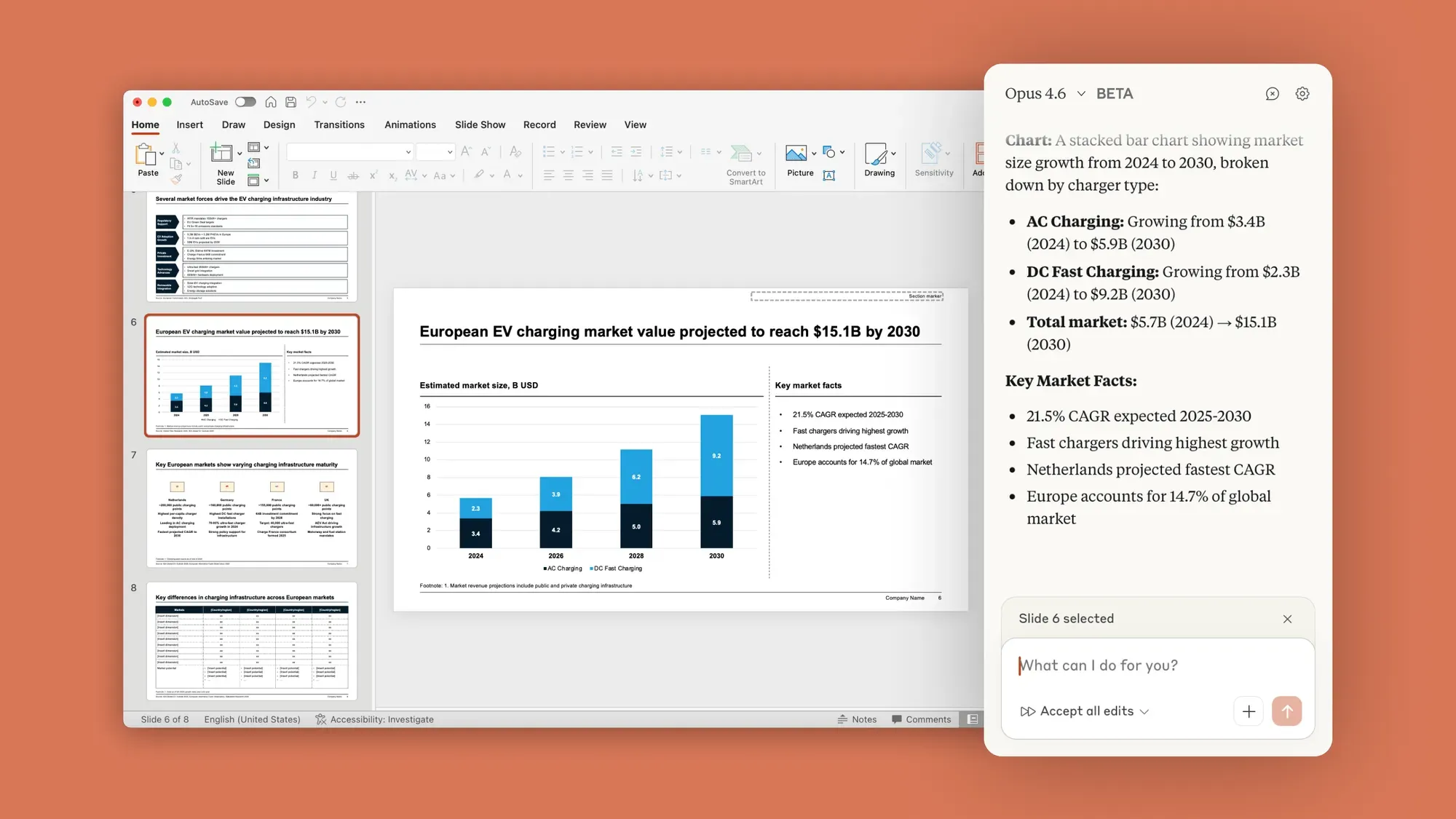
Claude in PowerPoint allows users to choose and switch between Sonnet 4.5 and Opus 4.6 depending on task complexity. Third-party testing has suggested using Opus 4.6 for complex restructuring work and Sonnet 4.5 for quicker, more contained edits, though Anthropic's official documentation does not prescribe specific use cases for each model within the PowerPoint context.
Another workflow that deserves attention is the Excel-to-PowerPoint pipeline. Claude in Excel launched earlier and supports full spreadsheet functionality, including pivot table editing, chart modifications, and conditional formatting. With the addition of Claude in PowerPoint, users can now take data structured in Excel and bring it to life visually inside PowerPoint, turning raw financial models or operational data into presentation-ready slides without manual rebuilding.
MeetGeek: An AI-powered meeting assistant that automatically records, transcribes, summarizes, and analyzes virtual meetings in real time.
Limitations Worth Knowing
Anthropic is transparent about several genuine limitations, and any honest evaluation of the tool needs to include them.
- Claude in PowerPoint is in beta, and Anthropic has recommended that users review all changes before finalizing, especially for critical deliverables.
- Some advanced PowerPoint features may not yet be fully supported.
- Chat history is not saved between sessions, meaning you start fresh each time you open the add-in, which limits continuity for complex, multi-session projects.
- For Team and Enterprise users, the tool does not yet inherit custom data retention settings and is not currently included in Enterprise audit logs or the Compliance API. For compliance-heavy industries, that gap needs to be understood before widespread deployment.
Anthropic has also been notably open about a security risk, such as prompt injection attacks, that AI tools of this type face. AS Claude can read the contents of the open file to understand its context, malicious instructions hidden within the file, such as downloaded templates or vendor files, could theoretically trick the model into extracting sensitive information or taking damaging actions.
Anthropic's guidance is explicit: only use Claude in PowerPoint with trusted files, and do not use it with external, untrusted sources.
In Conclusion:
Overall, Claude in PowerPoint looks very capable and can genuinely minimize the manual work that comes with creating a PowerPoint presentation. If you use it right, this PowerPoint add-in can work alongside you while you build and revise, allowing you to ask targeted edits, generate new slides from your template, and iterate without starting over.
Obviously, it has its own limitations, which users can easily tackle as long as they review the AI-generated output, remember that chat history is not saved, no Compliance API, and only use trusted files to mitigate prompt injection attacks. If you are a Claude Pro, Max, Team, or Enterprise customer, then you must give it a go.
💡 For Partnership/Promotion on AI Tools Club, please check out our partnership page.
