


For decades, workplace automation meant writing scripts, building integrations, or hiring developers to connect your tools. In 2026, Anthropic has pushed a different idea: what if your AI assistant could simply sit down at your machine, open your apps, and get the work done itself? That's precisely what Claude's new computer use capability (in research preview) is designed to do.
What Is Claude's Computer Use, Exactly?
Claude's computer use is now available inside Claude Cowork and Claude Code, and it enables Claude to use your computer to complete tasks like opening files, navigating a browser, and running developer tools, all without any setup required.
This is not a macro tool or a robotic process automation (RPA) script in disguise. Claude will read your screen, reason about what it sees, and decide what to click or type next, much like a remote colleague who's been handed temporary control of your machine.
This feature is currently in research preview for Claude Pro and Max subscribers, and is supported on macOS only. You'll need to make sure your desktop app is awake and running to use it.
AINews.sh: Stay ahead with the latest AI product releases, in-depth reviews, and news. Compare AI tools, open-source models, and paid platforms.
How the Permission and Priority System Works
One of the more thoughtful design choices here is how Claude decides which tool to reach for first. Claude will reach for the most precise tool first, starting with connectors to services like Slack or Google Calendar. When there isn't a connector available, Claude can directly control your browser, mouse, keyboard, and screen to complete tasks like scrolling, opening, and exploring, always asking for your explicit permission first.
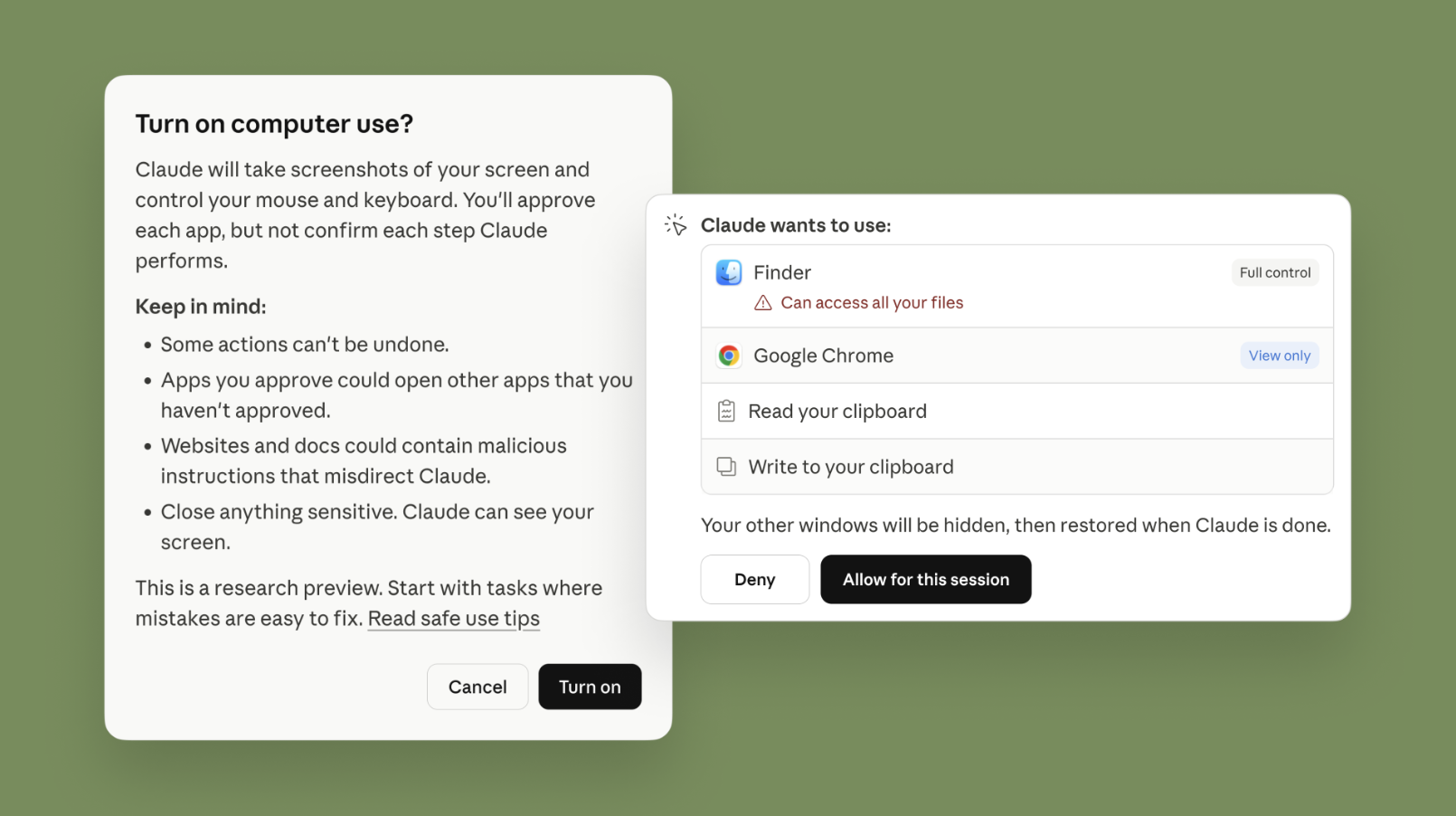
This layered approach matters. It means Claude isn't defaulting to screen control when a cleaner, faster integration already exists. Screen-based control is the fallback, not the default, a meaningful distinction for anyone thinking about reliability and consistency in automated workflows.
Key behaviors to understand about how computer use works:
- Connector-first logic: Claude will use Slack, Google Calendar, and other direct integrations before touching your screen.
- Explicit permission gates: Claude requests your approval before opening any new application on your desktop.
- Stop control: You can halt Claude at any point mid-task.
- Automatic threat scanning: When Claude uses your computer, Anthropic's system automatically scans model activations to detect prompt injection attempts.
- App restrictions: Some applications are off-limits by default to minimize exposure to sensitive data.
Dispatch: Assign Tasks From Your Phone, Pick Up Results on Your Desktop
Running alongside computer use is Dispatch, a feature in Claude Cowork, now also available in Claude Code, that lets you have a single continuous conversation with Claude from your phone or desktop. You can assign Claude a task on your phone, turn your attention to something else, then open up the finished work on your computer.
The practical use cases are easy to picture. You're on a commute and want your inbox scanned before you arrive at your desk. You're in a meeting and want a pull request drafted by the time you're back. You can tell Claude to automatically check your emails every morning or pull some metrics every week, and Claude will handle it from there.
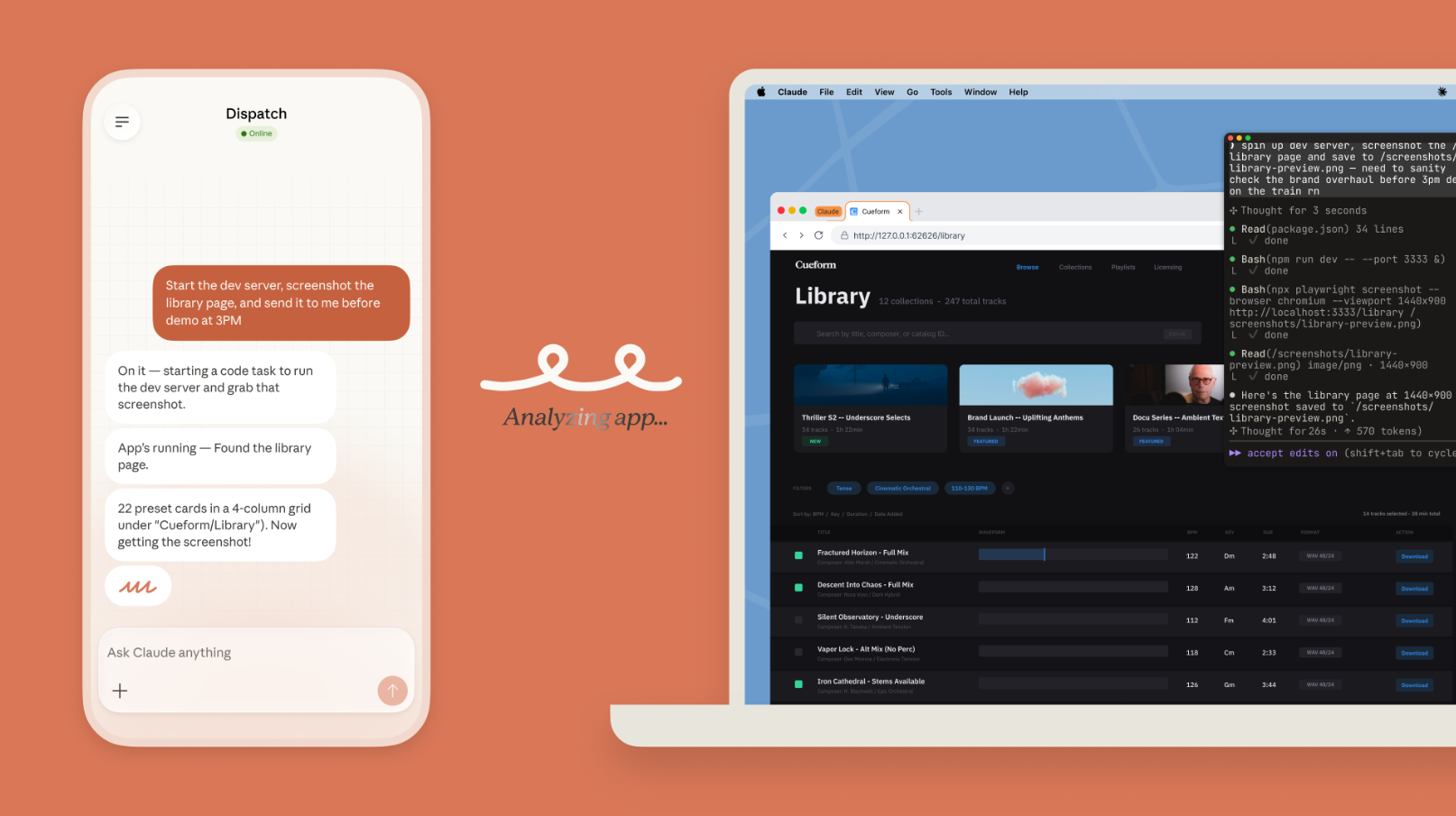
When computer use and Dispatch are combined, the possibilities expand further:
- Morning briefings: Claude can synthesize overnight emails and news into a summary while you're still on your way in.
- IDE workflows: Claude can autonomously make changes in your IDE, run tests, and put up a pull request.
- Recurring reports: Schedule Claude to pull data every Friday and have it formatted before your standup.
- Long-running projects: Claude can keep a project like a 3D-printing build moving forward according to your initial plan while you focus on other tasks.
What to Realistically Expect Right Now
Anthropic is being honest about current limitations. Computer use is still early compared to Claude's ability to code or interact with text; complex tasks sometimes need a second try, and working through your screen is slower than using direct integration.
That's a fair and honest framing. Screen-based control is inherently less reliable than a direct API handshake. Latency, visual rendering differences, and unexpected UI changes in apps can all confuse the model. Anthropic has recommended starting with apps you trust and avoiding sensitive data until the technology matures.
Final Thoughts
What makes this moment significant isn't just the feature itself but what it shows about where AI assistants are heading. The gap between "AI that advises" and "AI that acts" is narrowing fast. Claude's computer use capability is one of the clearest examples yet of that change happening in a shipping product, not just a research paper.
For professionals who spend hours on repetitive, cross-app work like data entry, report generation, browser-based research, and developer operations, this is worth watching closely. The research preview stage is also an opportunity, as the early users who experiment now will be better positioned to build efficient human-AI workflows as the feature matures and expands beyond macOS.
💡 For Partnership/Promotion on AI Tools Club, please check out our partnership page.
